
Maverick Auto-Dimming and HomeLink Mirrors: What Must Match?
CHECK THE MOUNT, WIRING AND GARAGE OPENER
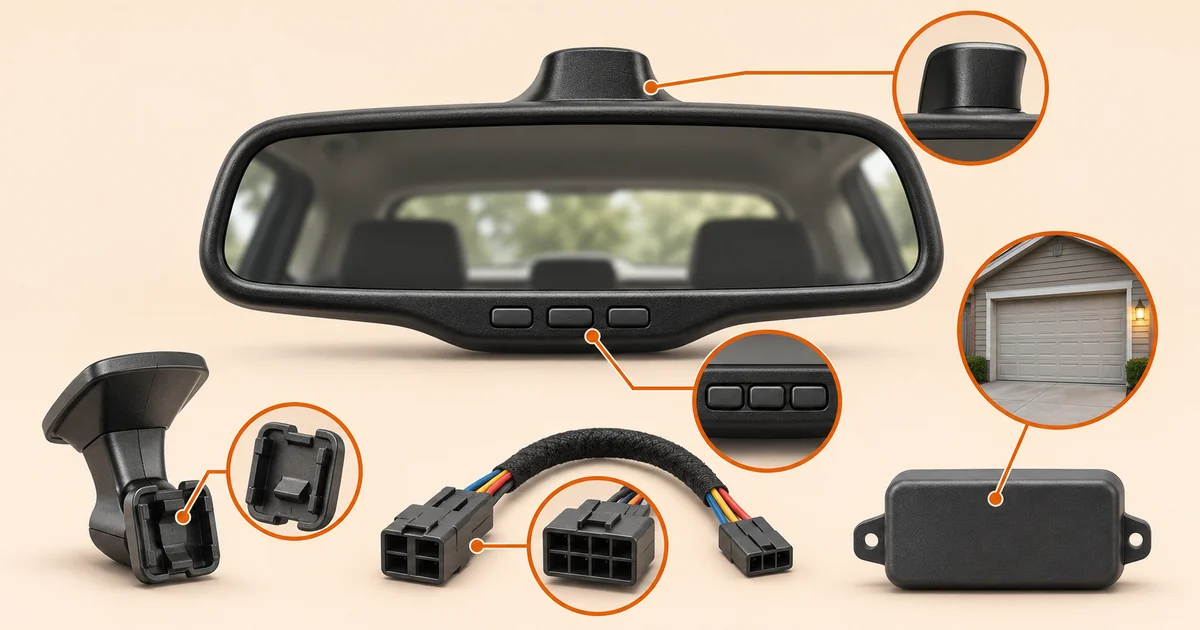
A Maverick auto-dimming/HomeLink mirror upgrade has three separate checks: the physical mount, supported electrical integration and your actual garage-door system. A familiar Gentex shape or matching connector does not prove plug-and-play fit. Choose an exact mirror/harness arrangement for the truck’s year and equipment, then verify HomeLink compatibility rather than assuming every opener or existing feature will work unchanged.
Fit Assistant · For your setup
Apply this to your mirror upgrade
Tell us a little about your situation. Fit Assistant will help you apply this guide.
Separate the functions you want
Auto-dimming, a compass, garage-door control and a camera display are different features. A used mirror or universal kit may include some and omit others.
| Desired function | What to identify | Common mistake |
|---|---|---|
| Reduced headlight glare | Actual auto-dimming mirror and supported installation | Assuming every similar-looking mirror dims |
| HomeLink buttons | Exact mirror/control generation | Assuming it works with every opener |
| Compass | The actual listed feature and any setup requirements | Inferring it from another version’s picture |
| Camera display or retained equipment | Complete supported integration | Treating an ordinary dimming mirror as a camera system |
Make a short feature list before shopping. That prevents buying a cheap used mirror and discovering it does not provide the function that motivated the project.
What does a Gentex aftermarket listing establish?
The VOXX/Gentex ADVGEN40A4 page describes an auto-dimming mirror with HomeLink and broad compatibility with many vehicles. It also lists separate mounting accessories.
That establishes a product category to investigate, not an exact Maverick mount, harness or equipment approval. “Most vehicles” is not a parts list for your specific year and windshield area.
Gentex’s support page directs aftermarket installation questions to the actual product instructions and supplier. Keep those instructions attached to the chosen mirror rather than treating a brand name as an installation procedure.
Gate one: does the physical mounting arrangement match?
Identify the truck’s existing attachment and the exact mirror/adapter combination the supplier supports. Similar exterior appearance does not establish the correct interface, mirror position or clearance.
Look at the complete windshield area. Nearby camera or sensor housings, covers and other accessories can change the usable space. An adapter that attaches mechanically may still put the mirror in an unsuitable position or interfere with existing equipment.
Ask for the documented combination for the actual truck. Do not guess an adapter from its photograph or modify the windshield mount to make a broadly marketed mirror fit.
Gate two: is the harness supported for this truck?
A connector that clicks into another connector does not prove the power, signal or pin arrangement is correct. Require the supplier to identify the exact mirror, harness revision, vehicle year and equipment combination.
For a truck with a factory windshield camera, verify that the proposed installation preserves the required system operation. Do not assume a nearby connector is a convenient spare power source.
An owner’s successful custom harness is useful discovery, but it does not approve a generic replacement harness. Ask what is included, whether any modification is required and who supports troubleshooting if a function does not work.
This guide does not provide wire colors, fuse selections, pinouts or a camera-power tapping recipe. Those require current application-specific information, not a general buying comparison.
Gate three: will HomeLink operate your door?
Use HomeLink’s programming/support resources with the actual opener model and the selected HomeLink system. A working mirror installation and a compatible garage-door system are separate outcomes.
HomeLink support describes a compatibility-bridge case involving an older HomeLink variant and certain newer opener arrangements. That is not a rule that every Maverick retrofit requires a bridge, or that any bridge fixes every unsupported opener.
Record the garage-door opener’s model and the mirror’s actual HomeLink generation where available. Follow the relevant programming guidance. Do not buy additional hardware solely because another owner with a different opener needed it.
Compare the complete installed package
| Quote line | What should be named |
|---|---|
| Mirror | Exact model and desired features |
| Mechanical attachment | Approved mount/adapter for the truck |
| Electrical integration | Supported harness and retained equipment |
| Opener support | Compatibility and any actual required bridge |
| Installation | Work, function checks and support responsibility |
A universal mirror price and a complete year-specific kit are not comparable totals. A used mirror can be a good component only when the rest of the application is resolved.
Ask about returns before installation or modification. If the supplier cannot establish the harness and mounting combination, a low advertised price does not make the uncertainty disappear.
Two practical decisions
2025 truck with windshield camera, generic mirror and a look-alike plug: stop short of assuming plug-and-play. Ask for the actual supported harness and mount, including camera/sensor retention. The connector’s shape answers only a small part of the question.
Confirmed mirror/harness kit, older garage-door system: finish the separate opener check. A compatibility bridge may be relevant to some combinations, but verify the exact case instead of adding one automatically.
For another accessory sharing the driver’s view and controls, the Maverick phone/charging guide uses the same principle: assess the complete arrangement, not one attractive component.
Compatibility snapshot
| Product or claim | Result | Required check |
|---|---|---|
| ADVGEN40A4 broad application | Candidate category, not exact Maverick approval | Mount, harness and vehicle equipment · VOXX/Gentex ADVGEN40A4 page · Gentex’s support page |
| Same-shaped connector | Does not establish electrical compatibility | Supported application/pin arrangement · Gentex’s support page |
| HomeLink-equipped mirror | Opener compatibility remains separate | Exact system and programming guidance · HomeLink’s programming/support resources · HomeLink support |
| Bridge hardware | Relevant only to supported combinations | Actual HomeLink/opener requirement · HomeLink support |
Before you buy
Finish with the features you want and a complete supported mirror/mount/harness package. Then confirm the actual door operation. That is a useful retrofit plan without turning one successful forum installation into a universal promise.
Sources & notes
Reviewed 7 November 2026. VOXX/Gentex ADVGEN40A4, Gentex support, HomeLink and HomeLink support. No exact unverified Maverick harness, wiring recipe or universal garage-door compatibility is claimed. See our methodology.