
Maverick MagSafe Charging: Mount, Charger or Factory Pad?
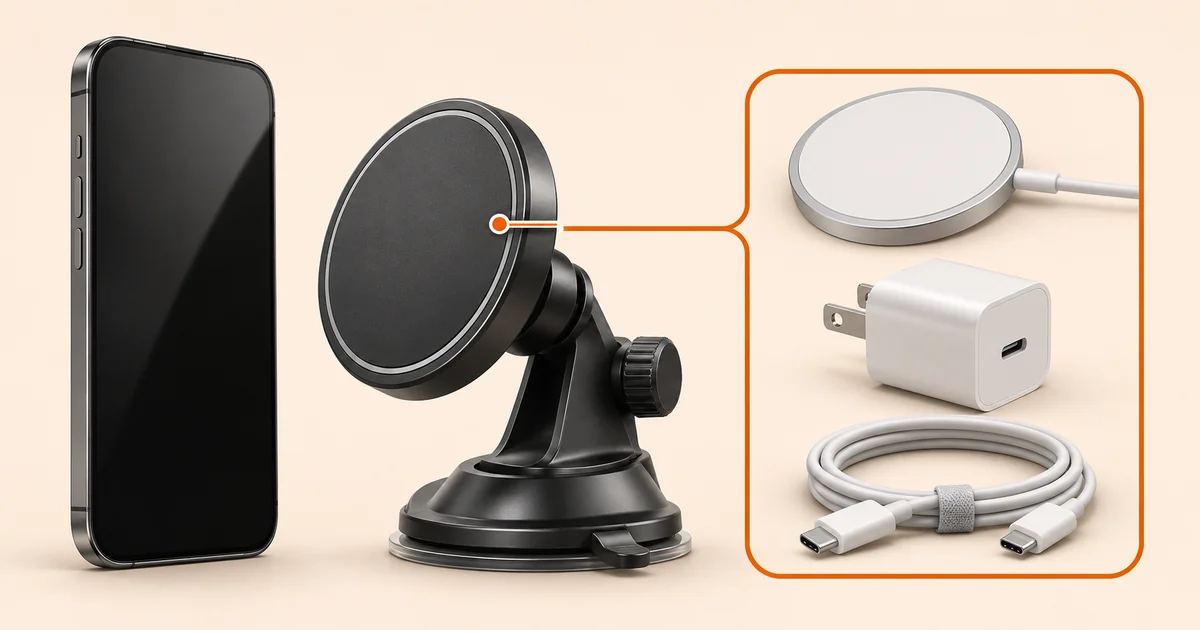
SEPARATE HOLDING YOUR PHONE FROM CHARGING IT
A magnetic holder does not necessarily charge your phone. In a Maverick, choose the holder, charging method, phone/case compatibility and power supply as separate parts of the setup. A factory pad, charging mount and wired cable solve different tasks. Neither a MagSafe label nor a 15W output claim proves your truck’s USB port or chosen mounting location will deliver the expected result.
Fit Assistant · For your setup
Apply this to your phone charging setup
Tell us a little about your situation. Fit Assistant will help you apply this guide.
Which setup are you actually choosing?
Start with whether you need visible navigation, charging convenience or simply a place to put the phone.
| Route | Holds the phone? | How it charges | Main check |
|---|---|---|---|
| Passive magnetic holder | Yes, with a supported phone/case | It does not charge by itself | Separate wired cable or charger |
| Magnetic charging mount | Supported retention arrangement | Wireless charging with suitable power | Phone/case, adapter and actual vehicle position |
| Factory wireless pad, if fitted | A storage/charging location | Vehicle’s equipped charging system | Actual device alignment and case compatibility |
| Wired charging without a new mount | Uses your existing storage/holder | Supported cable and power source | Access, cable routing and device requirements |
Wireless CarPlay or Android Auto is a data/connection feature. It does not supply wireless charging, and fitting a wireless charger does not automatically add wireless phone projection.
A specific charging-mount example
Anker’s A2932 user guide describes a vent-mounted MagGo car charger with 9V/2.5A input and 15W maximum output. Its named compatible devices are iPhone 12–15 series.
The input and output are different specifications. Do not assume any USB-A port plus an adapter cable supplies the required input, or that a “15W” label is the power requirement for the source. Select a compatible supply using the actual charger instructions.
Likewise, do not transfer a newer Apple charger’s headline output to this particular Anker product. Product model and revision matter, even where both are described as magnetic wireless chargers.
These are documented charging specifications, not our test of that charger on a Maverick vent.
Test the phone and case together
Identify the exact phone and the case you normally use. A thick case, attached wallet, ring or metal plate can change whether a mounting/charging combination works. Ask the device and accessory maker to confirm the actual arrangement rather than assuming a magnetic attachment proves charging compatibility.
Ford’s factory wireless-charger instructions also note that a case can affect charging and advise checking the specific device in the vehicle. That section concerns an equipped 2022 truck, not a promise that every Maverick year or trim includes a pad.
For a new phone, repeat the compatibility check. A guide listing a prior device family does not approve every later model by implication.
Does a vent mount fit the Maverick?
The charger’s general vent attachment is only a starting point. Inspect the actual vent shape and the final phone position in your truck. A mounting clip may be broadly marketed while still being unsuitable for a particular vent or case/phone weight.
With the vehicle parked, consider access to controls, visibility, charging cable reach and the intended viewing angle. Do not block safety equipment or place the phone in an airbag area. Use an approved attachment and the maker’s instructions rather than treating a review photo as a mounting template.
If the vent arrangement is unsuitable, compare a different documented vehicle mount or keep a wired setup in a suitable existing location. A charging feature does not make an awkward location better.
What about heat and actual charging speed?
A maximum output figure is not a guaranteed sustained rate. The phone, case, state of charge, power supply and environment affect the outcome. Apple’s MagSafe guidance notes that the phone or charger can warm and that software may limit charging when the battery is too warm.
An owner’s report that a fan-equipped charger felt cooler is useful experience, not a controlled comparison or a promise for your phone. This guide does not rank fan designs or claim a measured Maverick charging speed.
Test your normal routine before treating the upgrade as a solution: the actual navigation/connection use, phone case and power source. If the device becomes unsuitable for charging in those conditions, follow the maker’s guidance rather than trying to defeat its protections.
Price the complete setup
| Item | What must be specified |
|---|---|
| Holder/base | Vehicle location and supported attachment |
| Charger | Exact model and phone/case support |
| Power source | Required input and compatible adapter |
| Cable | Correct connection and practical length |
| Final arrangement | Controls, visibility and charging verified together |
A low holder price cannot be compared with a complete charging mount without adding the missing pieces. Conversely, if a cable already solves the problem, you may not need a new charger.
Two practical decisions
2024 truck, iPhone 14 in a thick case, passive holder: the holder can be useful without charging. Add a supported wired connection or compare a complete charging route; do not assume the magnet contains charging hardware.
Considering A2932 on an ordinary USB port: resolve its required input and your phone/case first. Then test the vent and complete position. An advertised 15W maximum does not prove any existing port can deliver the intended setup.
Compatibility snapshot
| Product or claim | Result | Required check |
|---|---|---|
| Passive magnetic holder | No charging implied | Separate charging route · Anker’s A2932 user guide |
| A2932 | Documented charger specifications | Exact phone/case, supply and mounting · Anker’s A2932 user guide · Apple’s MagSafe guidance |
| Factory pad | Relevant only if fitted | Year/equipment and actual device test · factory wireless-charger instructions |
| “Wireless CarPlay means charging” | Different functions | Charging hardware and power still required · factory wireless-charger instructions · Apple’s MagSafe guidance |
Before you buy
Finish with the location, retention method and charging chain that suit your phone. You can keep a simpler wired arrangement if it solves the task more comfortably.
Sources & notes
Reviewed 7 November 2026. Anker A2932 guide, Ford equipped-charger guidance, and Apple MagSafe guidance. No original temperature, retention or charging-speed test is claimed. See our methodology.